Infranautic

Review each infrastructure change once.

If the same OpenTofu code runs in dev, staging and prod, you shouldn't have to read the same plan three times. Infranautic plans every environment a pull request touches and shows you one combined plan. After you merge, it applies what you approved, and stops to ask if anything else has crept in.

Access is by invitation while we onboard our first customers.

On the pull request

One plan for every environment

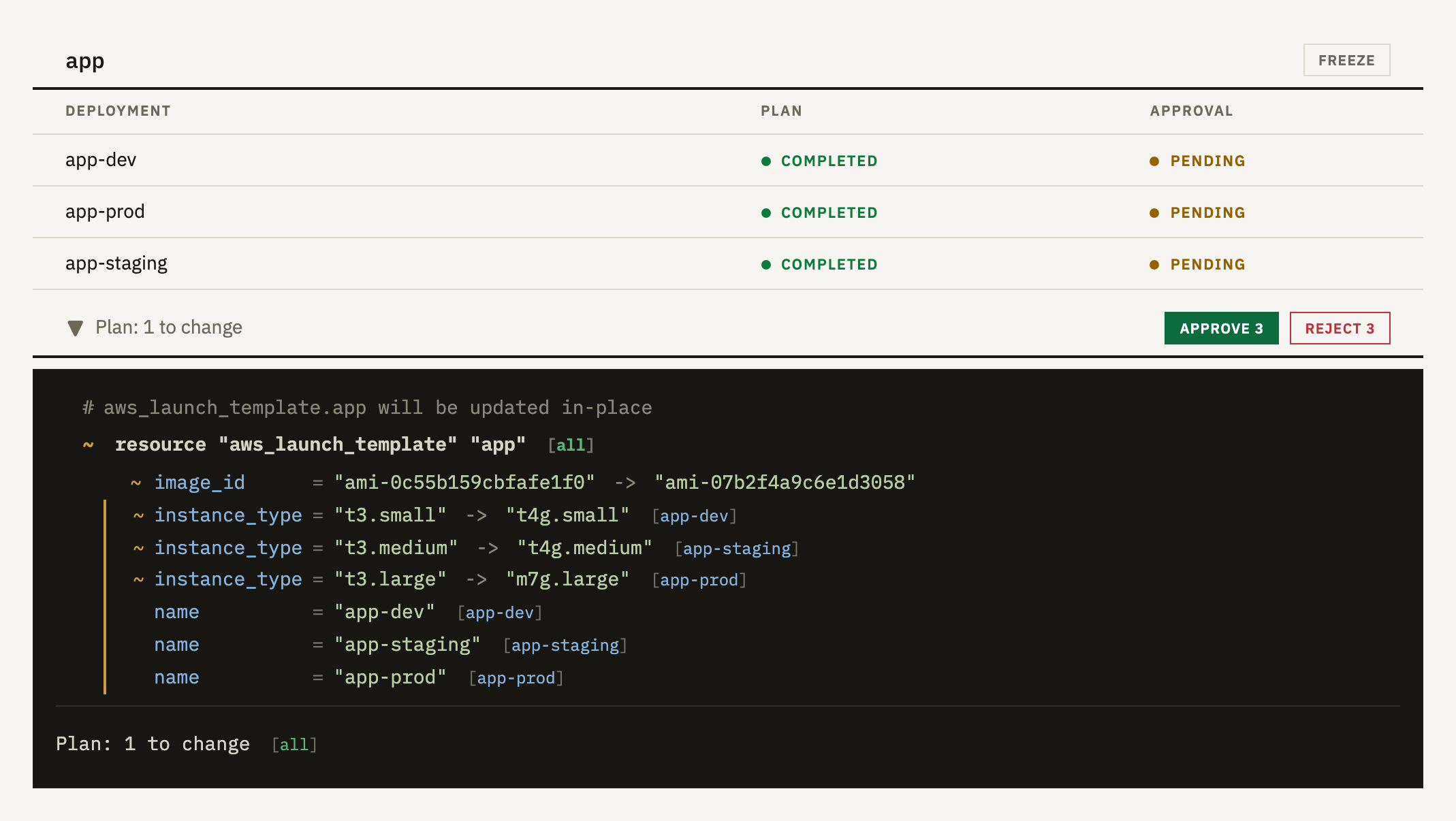
Every pull request is planned against each copy of the code it affects, such as app-dev, app-staging and app-prod. The plans are merged into one. A change that's the same everywhere appears once, and anything that differs is shown for each copy, labelled with its name. You approve this combined plan one to cover all the environments.

The app component on a pull request. Three deployments, app-dev, app-staging and app-prod, are waiting for approval. Below them is one plan. The launch template's machine image changes to the same arm64 image everywhere, shown once. Its instance type changes differently in each deployment, from t3.small to t4g.small in dev, t3.medium to t4g.medium in staging, and t3.large to m7g.large in prod, each labelled with the deployment's name.
Moving the app to Graviton. The machine image is the same everywhere, but the instance size isn't.
After the merge

Only what you approved is applied

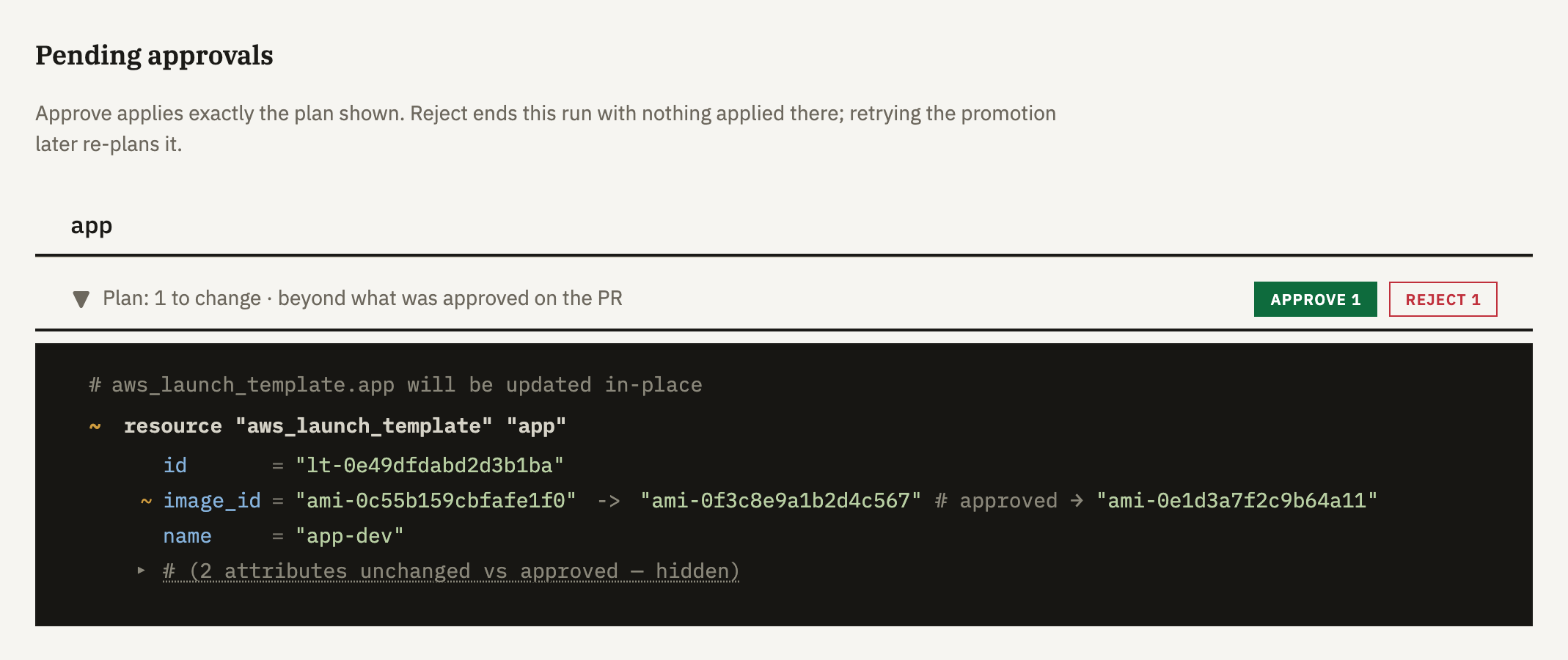
Things can change after you review a plan. Someone edits a resource by hand, or another pull request lands first. So we plan again right before applying and compare the result with the plan you approved.

If it's no more than you approved, it goes ahead without asking you again. If not, it waits for you and shows only what's different.

A pending approval for the app component. The plan now changes the machine image to a different ID from the one approved on the pull request, and a comment shows the approved value. Approve and Reject buttons sit above the plan.
The new plan for app-dev wants a different machine image from the one you approved, so the apply is waiting.
Through your environments

Roll out one environment at a time

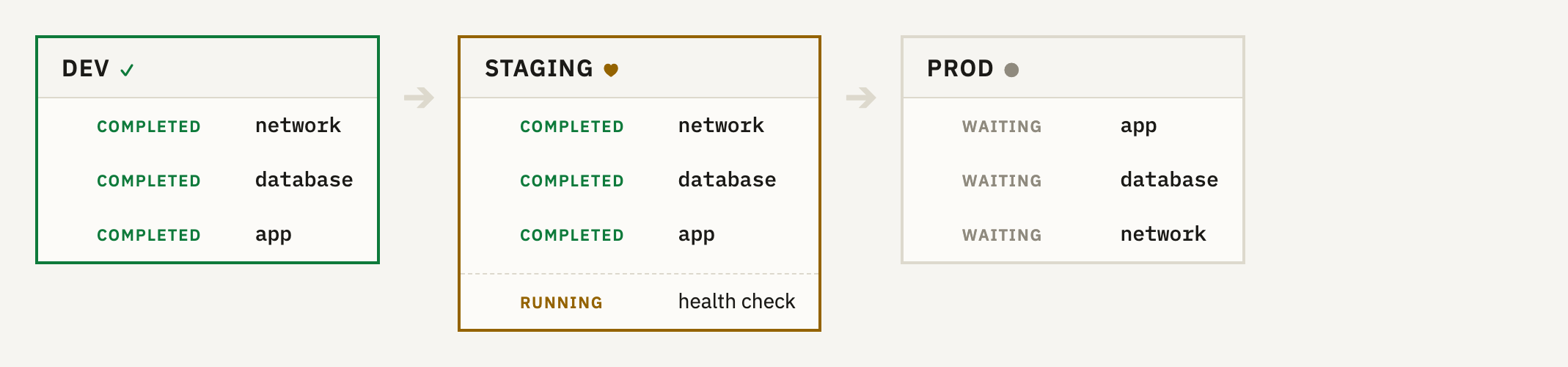
You choose the stages, such as dev, then staging, then prod. Inside each stage, things apply in dependency order, which we work out from your plans, so the network goes before the database that sits in it.

A stage can also run a health check script from your repository, and if it fails, the later stages don't start.

A promotion page with three stages. Dev has completed. Staging has applied network, database and app and is running its health check. Prod is waiting.
Dev is done, staging is running its health check, and prod is waiting for it.

Also included

Drift detection

Every plan and apply is also a drift check, and a deployment that hasn't had one in a day gets checked anyway. If your infrastructure no longer matches the code, you decide whether to put it back.

Scheduled applies

Apply chosen resources on a cron schedule, for jobs like certificate renewal.

Freezes

Pause applies to chosen components during a change window. Plans and drift checks carry on.

Dependencies

Worked out from remote state and data source lookups, with nothing to declare. They set the apply order, and on a pull request they show which deployments in other repositories depend on what you're changing.

Resource search

Search every resource we've planned or applied, by name or cloud ID, and see which deployment manages it.

Shared modules

Modules are validated on every pull request. If you change one, you'll see the deployments in other repositories that use it.

Runners

Each operation runs in its own single-use micro-VM, on our runners or on a runner cluster in your own AWS account.

Sign in with GitHub

Access follows your repository permissions on GitHub, and there's no charge per user.
Try it on your own repository

We're onboarding our first customers personally, so access is by invitation. Email us about your setup and we'll get you going.